Ethernet direct connection : multiple network adapters
Question
Occasionally, my husband brings home his office laptop. As I have a desktop PC at
home which is connected to the Internet, I want to share the Internet with him
over an Ethernet crossover cable since both computers have built-in Ethernet.
However, the only Ethernet port on my desktop is connected to a cable modem. How
can I have another Ethernet port on my desktop for connection to his laptop?
Answer
The layout below illustrates all cable connections in your situation. Your
husband's laptop is connected to your desktop using an Ethernet crossover cable.
Meanwhile your desktop is connected to the cable modem using a standard
(straight-through) Ethernet cable. As the only Ethernet port (i.e. connector #3
in the diagram) is used for connection to a cable modem (i.e. via connector #4),
you have to install another Ethernet adapter in your desktop.
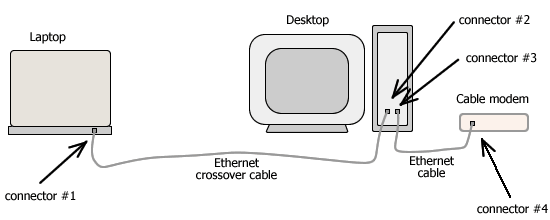
Rear view diagram:
Ethernet direct connection
The desktop is connected to the Internet using a cable modem.
Alternative 1. Buy an internal Ethernet adapter (i.e. PCI card). Most desktop
PCs are equipped with 3 - 5 PCI slots for additional modem, network adapter, or
video card. Open your computer casing, then you will see PCI slots inside, on
the motherboard. Insert the PCI card into a vacant PCI port. Close the casing,
then you will see additional Ethernet port on the back of your desktop (i.e.
connector #2 in the diagram). Install the Ethernet adapter's drivers, usually
given in a CD or floppy disk. This extra Ethernet port can now be used for
connection using a crossover cable to the laptop's Ethernet port (i.e. connector
#1).

Ethernet adapters and connectors
Internal (PCI) and external (USB, PCMCIA) adapters, RJ-45 and USB.
Alternative 2. Buy an external Ethernet adapter (i.e. USB Ethernet
adapter). This device will convert a USB port to an Ethernet port. Your desktop
must have a vacant USB port. Plug the Ethernet adapter to that USB port. And
there you go... Without opening your desktop casing, now you have an extra
Ethernet port, that's from the external adapter. Install the USB Ethernet
adapter's drivers. Now, you can connect your crossover cable to the Ethernet
(RJ-45) port on the face of this external adapter.
A computer (either desktop or laptop) may have more than one network adapters as
long as there are available slots to insert the adapters and the computer's
memory and processor are still capable of handling the network tasks. Please
note though, in your particular case if the desktop is running Windows XP,
network bridging to the Ethernet adapter that is used for Internet connection
must be disabled. You can check it by right-clicking Network Bridge icon on
Network Connections folder. If the desktop is running Windows XP SP2, just
select "No" if prompted for confirmation to create network bridge for this
Ethernet adapter.
|