Home Networking Guide : Wireless LAN
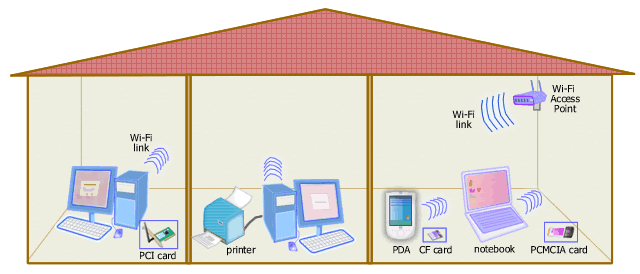
Picture: Wireless LAN (Wi-Fi) Home Network
A Wi-Fi access point connects computers and other devices in a Wi-Fi home
network.
Power jacks and power cables are not shown in the diagram for simplicity.
Wireless LAN is your home networking
solution if
- you need flexibility to move about or work anywhere in your house with your laptop,
- you don't want to introduce new data cables in addition to power
cords,
- you want your network to reach hard-to-wire rooms.
There are currently three popular wireless LAN specifications in use,
i.e. IEEE 802.11a,
802.11b, and
802.11g. The original
wireless LAN specification, that's IEEE 802.11, has been
practically abandoned. 802.11b and 802.11g are the most widely
used today in home networks and in public hotspots. Meanwhile
newer products based on the upcoming revision, i.e. IEEE 802.11n
which hasn't been finalized and ratified, has been widely
available in the market as draft-n or pre-n.
All wireless LAN systems based on the IEEE 802.11 standard
revisions are popularly known as Wi-Fi (Wireless Fidelity).
To create a wireless network at home, you need to have a wireless
(Wi-Fi) access point.
A wireless access point acts like a hub or a switch in Ethernet network that functions as a central
connection point. However, if you have only two computers to
connect, you don't need a Wi-Fi access point. You can create a
wireless network using Wi-Fi in ad hoc mode to connect both
computers.
If you want to buy a wireless access point, you must first check what are
included because very often one box combines several network
functions besides, such as bridge, switch, router, firewall, and broadband
modem. Most access points provide a connection (network bridge) to
wired Ethernet network. And for the purpose of connecting a
wireless network to the Internet, you may need a hardware named
wireless router. Wireless router is a combination of wireless
access point and router. Most wireless routers available today
have built-in Ethernet switch and provides several Ethernet ports and
sometimes a print server.
Each computer (desktop PC or laptop) or device (PDA, smart phone,
camera, printer, etc.) must have a Wi-Fi network adapter to join a
wireless LAN. There are various types of Wi-Fi adapter:
- built-in Wi-Fi adapter such as in Centrino notebook,
- internal Wi-Fi adapter, i.e. PCI/PCI Express card for desktop PC or mini PCI card for notebook, and
- external Wi-Fi adapter, i.e. PCMCIA card (PC Card) for notebook, CF
card for PDA, MMC card for cell phone, SD card for camera, or USB dongle.
It must be noted that all Wi-Fi adapters you choose must be
compatible with your access point. Since 802.11g is backward
compatible with 802.11b, both versions can work together in a
mixed 802.11b/g environment. On the other hand, 802.11a is not
compatible with both 802.11b and 802.11g.
|